WhatsApp now reaches approximately 2.78 billion monthly active users globally, making it the most popular messaging app on the planet. For e-commerce and mobile commerce, that audience is impossible to ignore.
Moreover, almost 200 million businesses already use WhatsApp Business tools, and the gap between brands that leverage this channel and those that don’t is widening fast. Do you want to learn how to use a WhatsApp chatbot for e-commerce to grow your business?
Table of Contents
- What Is a WhatsApp Chatbot for E‑Commerce?
- Why WhatsApp Chatbots Matter for E‑Commerce in 2026
- WhatsApp Business vs WhatsApp Business API: The Foundation
- How WhatsApp Chatbots Work for an Online Store
- Key Features to Look For in a WhatsApp Chatbot for E‑Commerce
- Top WhatsApp Chatbot Use Cases Across the E‑Commerce Customer Journey
- Emotional and Contextual Intelligence: Making Chats Feel Human
- How to Implement a WhatsApp Chatbot for Your E‑Commerce Store
- Best Practices for WhatsApp Marketing and Compliance
- Measuring Success: KPIs for Your WhatsApp Chatbot
- FAQs
- How much does it cost to run a WhatsApp chatbot for an e‑commerce store?
- Do I need developers to launch a WhatsApp chatbot, or can non-technical teams manage it?
- Will a WhatsApp chatbot replace my human customer support team?
- Is a WhatsApp chatbot useful for small e‑commerce brands, or only for big enterprises?
- How long does it take to launch a fully working WhatsApp chatbot for my store?
- Wrap-Up
What Is a WhatsApp Chatbot for E‑Commerce?
A WhatsApp chatbot is a software agent that interacts with customers in WhatsApp chats. It answers questions, recommends products, processes orders, and handles post-purchase support automatically, at any hour. Think of it as a virtual storefront employee who never sleeps.

In an e-commerce context, the bot connects directly to your store systems —product catalog, inventory, orders database, CRM, logistics providers— so it can give real-time answers instead of generic replies. When a customer asks about stock availability or order status, the bot checks live data and responds in seconds.
Typical tasks an e-commerce WhatsApp chatbot handles include:
- Answering FAQs (shipping times, return policies, payment methods)
- Sharing product images, prices, and variant options
- Collecting shipping addresses and confirming orders
- Sending order confirmation and delivery updates
- Processing returns and exchanges
Modern WhatsApp chatbots combine rule-based conversational flows (menus, buttons, quick replies) with AI-driven natural language processing to handle both structured requests and free-form questions. And because WhatsApp is a free app available worldwide, the bot is always accessible to international customers across time zones.
Why WhatsApp Chatbots Matter for E‑Commerce in 2026
Here’s why a WhatsApp chatbot is now a core channel, not a “nice to have”:
- Open rates on WhatsApp messages sit around 98%—roughly 4–5× higher than email.
- Businesses that respond within five minutes on WhatsApp see up to a 21× increase in conversions compared to those that take 30 minutes.
- Many consumers already prefer messaging apps over phone calls or email for support and shopping.
The idea behind conversational commerce is simple: customers browse, ask questions, and buy without ever leaving WhatsApp. The rest of this article covers how WhatsApp chatbots work, the key features you need, real use cases across the customer journey, and a step-by-step roadmap to launch one for your own e-commerce business.
WhatsApp Business vs WhatsApp Business API: The Foundation
Before you deploy any chatbot, you need to understand the two tiers of WhatsApp’s business tools, because picking the wrong one will limit everything you can do.
WhatsApp Business App:
- Free mobile app designed for micro-businesses
- Manual replies, basic catalog, away messages, and labels
- Limited to one device —no scalable automation
- No chatbot integration, no multi-agent support
WhatsApp Business API (Business Platform):
- Server-side access required for serious e-commerce automation
- Supports WhatsApp bots, multiple agents, template messages, and deep integration with any chatbot platform
- Enables outbound WhatsApp notification messages (order confirmations, shipping updates, promotional campaigns)
- Requires Meta Business Manager verification, display name approval, and compliance with opt-in rules
There’s also a 24-hour customer care window to understand: after a user sends a message, you can reply freely for 24 hours. After that, outbound messages must use pre-approved templates categorized as Utility, Marketing, or Authentication. If your “Utility” template contains promotional language, Meta may reclassify it as Marketing and charge accordingly.
The rule of thumb: micro shops can start with the app, but any brand doing thousands of orders per month needs the API with a dedicated platform.
How WhatsApp Chatbots Work for an Online Store

A WhatsApp chatbot sits between your WhatsApp users and your e-commerce systems, orchestrating data and conversations in real time. It acts as a smart router that interprets what the customer wants and fetches the right information from the right system.
Here’s the high-level message flow:
- A customer sends a WhatsApp message (text, button tap, or image).
- The WhatsApp business api receives the message and passes it via webhook to the chatbot engine.
- The chatbot engine interprets intent-rule-based matching or AI-powered natural language processing.
- If backend data is needed, the engine queries your store (products, orders, inventory) via APIs.
- The bot sends a structured reply: text, buttons, product carousel, or tracking link.
The role of NLP here is critical. The bot detects intents like “track my order,” “show dresses under $100,” or “change my shipping address” and maps them to specific backend actions. Machine learning models improve accuracy over time as the bot handles more customer messages.
Integrations matter: platforms like Shopify, WooCommerce, Magento, and BigCommerce connect via apps, plugins, or direct API calls. Vendors like WAzion and DialogTab offer native connectors that sync product catalogs, inventory levels, and order data in real time.
Human handoff is equally important. When the bot detects a complex issue or negative sentiment —an angry customer, a billing dispute, a question outside its scope— it routes the conversation to a live agent with full chat history. The customer stays in the same WhatsApp thread, so the experience feels seamless.
Rule-Based vs AI‑Driven WhatsApp Chatbots
Most e-commerce chatbots mix both approaches to balance reliability with flexibility.
Rule-based flows use click-based menus, quick replies, and decision trees. They’re predictable, fast, and easy to QA. Perfect for structured tasks like order tracking, returns initiation, and COD confirmation. When a customer clicks “Track My Order,” the bot follows a fixed path every time.
AI-driven behavior uses natural language processing to understand free-form text. An AI chatbot can handle queries like “Do you have this jacket in navy, size L?” or “I need a birthday gift for my sister under $50.” It extracts entities (color, size, budget, occasion) and queries the catalog dynamically.
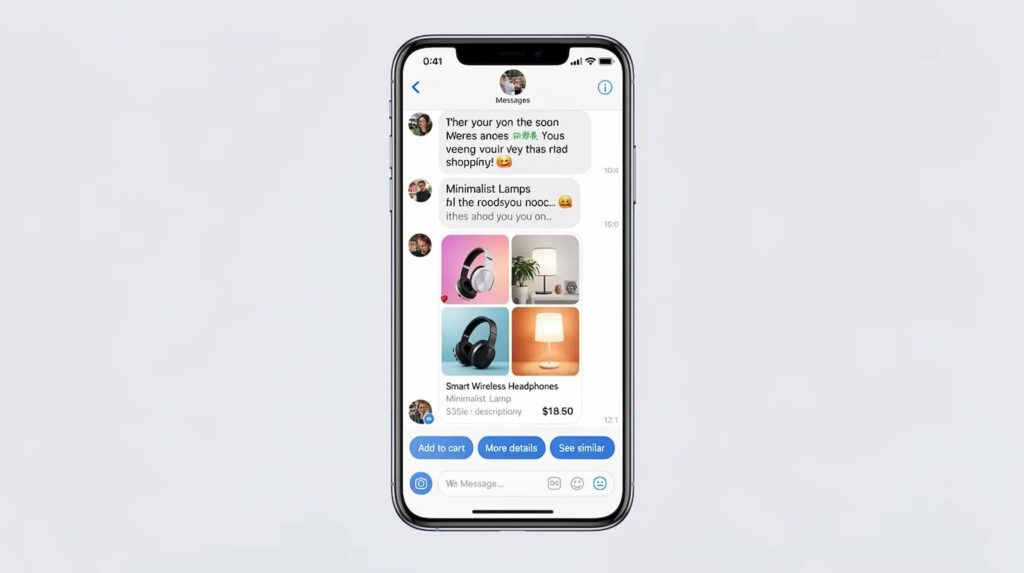
Here’s a concrete example: a shopper types “show me black running shoes in size 9 under 80 dollars.” The WhatsApp AI chatbot parses the filters —color (black), category (running shoes), size (9), price ceiling ($80)— and returns matching products as a carousel with images, prices, and “Add to Cart” buttons.
The practical advice: start with rule-based flows for core journeys (order tracking, FAQs, returns) and gradually layer in AI for product discovery and open-ended support. AI-powered chatbots get smarter with volume, but they need reliable fallbacks from day one.
Key Features to Look For in a WhatsApp Chatbot for E‑Commerce
This is your checklist for choosing or designing a WhatsApp chatbot solution in 2026. Not every platform offers everything, so prioritize based on your store’s biggest pain points.
Core commerce features:
- Catalog browsing inside WhatsApp (product cards, carousels, filters)
- In-chat checkout or secure checkout links
- Automated order management and order tracking
- Returns and exchanges workflows
- Abandoned cart recovery sequences
Personalization features:
- Recommendations based on purchase history and browsing behavior
- Language and locale detection
- Special occasion campaigns (birthdays, holidays)
- Loyalty program integration
Marketing features:
- WhatsApp marketing broadcast campaigns
- Segment-based targeting by customer types
- Triggered WhatsApp notification messages for restocks, price drops, and flash sale events
Operational features:
- Analytics dashboard with CSAT and resolution metrics
- Visual flow builder (no-code preferred)
- Multilingual support
- Smooth live agent handoff with shared context
Product Discovery and In-Chat Catalog Browsing

One of the most powerful things a WhatsApp chatbot does for online shopping is bring product discovery directly into the conversation.
Instead of navigating tiny mobile web menus, shoppers interact with guided flows. They choose categories, price ranges, sizes, and brands through quick replies, and the bot returns a narrowed selection with images, descriptions, and prices —all inside the chat thread.
AI-powered search takes it further. A customer types “summer linen shirts” or “organic baby skincare gift set,” and the bot returns highly relevant results. For fashion stores, this might mean filtering by fabric, fit, and color. For electronics, it could be specs like screen size, refresh rate, and budget.
This reduces friction dramatically for mobile commerce users who would otherwise bounce from a cluttered product page. When a customer clicks on a product card, they can see details, choose variants, and add to cart without leaving WhatsApp.
Order Placement, Payments, and In‑Chat Checkout
Once a shopper picks a product, the WhatsApp chatbot captures shipping details, confirms variants (size, color, quantity), and creates the order in your e-commerce store, all within the conversation.
The confirmation step is straightforward: the bot summarizes items, totals, taxes, and delivery estimates, then asks for final approval before processing. A customer receives a clean order confirmation message with all details.
Payment handling varies by region. In some countries, WhatsApp-native payments are available. In most markets, the chatbot sends a secure payment link or an embedded checkout page. The key is using HTTPS links, tokenized payments, and compliant gateways (Stripe, Razorpay, etc.) to keep customer trust high.
The result: fewer abandoned checkouts on mobile, less form-filling, and more impulse purchases driven by conversational commerce. The buying process feels like texting a friend, not wrestling with a checkout form.
Automated Order Tracking, Returns, and Post‑Purchase Support
“Where is my order?” is the single most common question most online stores receive. A WhatsApp chatbot eliminates the majority of these tickets by giving instant answers.

The bot integrates with logistics providers, pulls live tracking data, and translates cryptic carrier statuses into clear language: “Your package left the warehouse in Chicago and is expected to arrive Thursday between 2–6 PM.” It can proactively send shipping updates, out-for-delivery alerts, and delivery confirmations, reducing anxiety and inbound volume.
For returns and exchanges, the flow works like this:
- Customer asks to return an item.
- Bot verifies order number and product.
- Bot asks for reason and optional photo upload.
- Bot issues a return label, pickup instructions, or exchange options.
- Customer receives confirmation and refund timeline.
Proactive WhatsApp notification messages —order confirmation, shipping updates, and delivery confirmation— significantly improve customer satisfaction and reduce “WISMO” (where is my order) tickets by up to 40%.
Abandoned Cart Recovery and Revenue-Driving Automations
Abandoned carts are the silent revenue killer in e-commerce. Most online stores see abandonment rates above 70%. The good news: WhatsApp’s 98% open rate makes it one of the most effective recovery channels available.
Here’s how it works: when a shopper adds items to their cart but doesn’t complete checkout, the store triggers an event. The chatbot sends a friendly reminder via WhatsApp, with images of the items left behind and a one-tap direct link back to checkout.
Dynamic incentives can push hesitant buyers over the edge:
- Limited-time discount (“Complete your order in the next 2 hours and save 10%”)
- Free shipping offer
- Bonus loyalty points
Beyond recovery, WhatsApp chatbots can run automated cross-sell and upsell sequences after a purchase. If someone buys running shoes, the bot might suggest performance socks or a shoe care kit a few days later.
The numbers back this up: companies report reclaiming 10–20% of abandoned cart value through WhatsApp recovery campaigns. That’s often enough to cover the entire cost of running the chatbot-and then some.
Personalization, Special Occasions, and Loyalty
A WhatsApp chatbot that remembers your customers feels less like software and more like a personal shopper. By leveraging purchase history, browsing behavior, and declared preferences, the bot can tailor every interaction.
Special occasion campaigns drive engagement and sales:
- Birthday messages with unique discount codes
- Holiday gift guides for Christmas, Valentine’s Day, Eid, or local festivals
- Anniversary offers for loyal repeat buyers
Loyalty program integration lets the bot check points balances, send tier upgrade notifications, and help customers redeem rewards during checkout. This builds customer loyalty without requiring the shopper to log into a separate portal.
Here’s a detailed scenario: a repeat skincare customer buys a 30-day moisturizer every month. Around day 25, the bot sends a gentle reminder: “Running low on your Daily Hydration Cream? Reorder now and earn double loyalty points this week.” The personal touch makes the message feel helpful, not spammy, and increases engagement because it’s perfectly timed.
This kind of personalized experience is what separates a forgettable transaction from a brand relationship.
Top WhatsApp Chatbot Use Cases Across the E‑Commerce Customer Journey
WhatsApp chatbots support full funnel acquisition, conversion, and retention. Each of the following use cases is written as a concrete scenario, not a generic theory.
Customer Acquisition and Lead Generation via WhatsApp
Brands drive first-time WhatsApp conversations through QR codes on packaging, in-store posters, Instagram Stories, and click-to-WhatsApp ads on Facebook Messenger and Instagram.
Opt-in mechanics are straightforward: a “WhatsApp us” button on product pages, or a checkbox at checkout saying “Get order updates and exclusive offers on WhatsApp.” Once a user opts in, the chatbot launches an interactive welcome flow.
The welcome flow qualifies the lead by asking about preferences, budget, and categories of interest. Based on answers, the bot automatically tags the lead for future WhatsApp marketing campaigns.
Example: A fashion D2C brand runs a style quiz inside WhatsApp. New users answer five quick questions about preferred styles (streetwear, formal, athleisure), price range, and favorite colors. The bot segments them accordingly, then sends targeted product drops only for their taste profile. This increases engagement because every message feels relevant.
Conversational Product Discovery and Recommendations
This is conversational commerce in action: the customer describes what they need, and the bot behaves like a personal shopper.
A parent types “a durable school backpack for a 10-year-old under $60.” The bot asks a follow-up-“Any color preference?”-then returns three matching options with photos, reviews, and an “Add to Cart” button.
A gamer types “27-inch 144Hz monitor under $300.” The bot filters by specs and returns top-rated options with comparison highlights.
The AI chatbot understands synonyms, slang, and follow-up clarifications, refining suggestions quickly. Multimedia support-photos, videos, size guides-helps shoppers feel confident enough to buy inside WhatsApp without visiting the website chatbot or mobile site.
These flows should feel human-like and supportive, not purely transactional. When a customer asks for help, the bot should respond the way a knowledgeable store associate would.
Customer Support, FAQs, and Live-Agent Collaboration
The WhatsApp chatbot instantly answers repetitive customer queries about delivery times, COD availability, return windows, and payment methods. For most online businesses, these questions make up 60–70% of total support volume.
When a customer reaches out with a complex billing issue, a complaint, or a sensitive topic, the bot escalates to a human agent. The handoff keeps the same WhatsApp thread, and the agent sees the full conversation history. From the customer’s perspective, it’s seamless.
A blended interaction might look like this:
- Customer asks about return eligibility → bot answers instantly.
- Customer asks about a damaged item → bot collects photos and order details.
- Bot routes to a live agent with context → agent resolves and offers replacement.
- After resolution, bot sends a quick CSAT survey to gather feedback on the experience.
This model keeps support costs low while ensuring happier customers who feel heard when it matters.
Shipping Updates, Returns, and Lifecycle Engagement
Transactional notifications—order confirmation, shipped, out-for-delivery, delivered—reduce anxiety and preempt inbound “where is my order?” messages. Each notification includes a tracking link so the customer can check the status on their own.

Returns are equally smooth. The bot walks the customer through reason selection, optional photo upload, and next steps (return label, store credit, or exchange). A customer receives confirmation and a timeline for their refund.
Lifecycle campaigns extend the relationship beyond the single transaction:
- Repeat purchase reminders for consumables (coffee, pet food, supplements) based on historical reorder cadences
- Post-purchase engagement: requesting ratings, inviting unboxing photo shares, or promoting VIP programs
- Customer feedback surveys after delivery to measure satisfaction and identify improvement areas
This lifecycle engagement boosts retention and builds a long-term relationship —not just a one-off sale.
Emotional and Contextual Intelligence: Making Chats Feel Human
A modern WhatsApp chatbot should understand context and emotion, not just keywords. This is what separates a frustrating bot from one that customers feel comfortable interacting with.
Contextual intelligence means remembering previous orders, preferred sizes, and past conversation history. If a customer asks about “the shirt I ordered last week,” the bot should know exactly which order they mean, no repetitive questions.
Emotional intelligence uses sentiment analysis to detect anger, confusion, or delight and adapt accordingly. An upset customer doesn’t need a cheerful upsell pitch. A delighted repeat buyer deserves recognition.
Blending context and emotion in WhatsApp interactions directly increases customer satisfaction and customer loyalty for D2C brands, especially in personal verticals like fashion and beauty, where human empathy in communication makes a measurable difference.
Practical Scenarios: From Upset to Delighted
Late delivery scenario: A customer types: “My order was supposed to arrive yesterday, and it still hasn’t. This is ridiculous.”
The bot detects negative sentiment and responds: “I’m really sorry about the delay on your order. Let me check the latest status right now.” It pulls tracking data: “Your package is currently at the local distribution center and is scheduled for delivery today by 5 PM. I know this is frustrating—here’s a 10% coupon for your next order as an apology.”
The customer feels acknowledged. The situation de-escalates without involving a real person.
Loyal customer scenario: The bot recognizes this is the customer’s third order in six months. When the customer asks about a new product, the bot responds: “Great to see you back! Since you’ve been with us for a while, I’ve unlocked early access to our new summer collection just for you. Want to take a look?”
A small surprise perk turns a routine interaction into a moment of delight.
Indecisive shopper scenario: A customer asks, “I can’t decide between the linen blazer and the cotton one. Help?”
The bot sends side-by-side product images, highlights fabric differences, and asks: “Are you wearing this to a summer wedding or for everyday office wear?” Based on the answer, it recommends one option with confidence.
When a customer asks for guidance and gets a thoughtful response, it builds trust, even when it comes from a bot. Metrics to track: reduced refund requests, higher repeat purchase rates, and improved CSAT scores from WhatsApp satisfaction surveys.
How to Implement a WhatsApp Chatbot for Your E‑Commerce Store
This is a practical roadmap from zero to a live WhatsApp chatbot. The main steps: define goals, secure API access, choose a platform, connect your store, design flows, test, launch, and iterate.
Start with two or three high-impact journeys before expanding. Don’t try to automate conversations for every scenario on day one.
A small D2C brand can realistically go live in 3–4 weeks. Here’s how to break it down.
Step 1: Define Objectives and Use Cases
Start with clear, measurable goals. For example:
- Reduce support tickets by 30% within 90 days
- Recover 15% more abandoned carts via WhatsApp
- Cut average first response time to under 2 minutes
Identify your top five customer intents from existing channels—email, Instagram DMs, phone calls. These become your priority chatbot flows.
Map user journeys on mobile: from product discovery to purchase and post-purchase. Decide which WhatsApp touchpoints matter most. Create a shortlist of must-have automations (shipping updates, COD confirmation, cancellation handling) based on current pain points.
Involve your support, marketing, and operations teams. The chatbot should solve real-world problems, not just look impressive in a demo.
Step 2: Get WhatsApp Business API Access and Choose a Platform
The process:
- Set up and verify your Facebook Business Manager account.
- Apply for whatsapp business api access (directly or through a solution provider).
- Complete display name approval and phone number registration.
- Select a chatbot platform with the features you need.
Platform selection criteria:
| Criteria | Why It Matters |
|---|---|
| E-commerce integrations | Native connectors for Shopify, WooCommerce, Magento save weeks of development |
| Visual flow builder | Non-technical teams can create and update flows without coding |
| Analytics dashboard | Track resolution rates, revenue, and CSAT |
| Multi-agent support | Scale human handoff as volume grows |
| Pricing model | Understand per-conversation WhatsApp fees plus platform subscription costs |
Cloud-based platforms are faster to deploy than building everything from scratch. For a medium-sized Shopify brand, connecting via an API partner and launching simple order tracking + FAQ flows first is the fastest path to value.
Step 3: Connect Your Online Store, CRM, and Logistics
Connect the chatbot to your e-commerce store via native apps, APIs, or plugins to sync products, prices, inventory, and orders in real time.
CRM or CDP integration enables richer personalization-you can segment by customer types, lifetime value, recent purchase behavior, and campaign engagement. When a customer reaches out, the bot already knows who they are.
Logistics integration is essential for live tracking and automated shipping updates. Connect your carriers so the bot can convert cryptic status codes into plain language with delivery windows.
Test a few orders end-to-end in a sandbox environment. Verify that product data, prices, stock levels, and order statuses are accurate. Customer data consistency across systems is the foundation of trust and smooth automation.
Step 4: Design Conversational Flows and Bot Persona
This step is where most of the creative work happens. Map dialogues for each use case, write the copy, and choose a tone of voice that’s on brand.
Best practices for flow design:
- Keep messages short, no walls of text
- Use clear quick-reply buttons for common paths
- Include rich media (images, carousels) for product browsing
- Design error-handling and fallbacks: when the bot doesn’t understand, it should ask clarifying questions or offer to connect to a real person
- Define the bot’s persona: friendly yet professional, consistent greeting and closing lines
Every major flow should include explicit options for “Talk to a human” and “Stop messages.” Transparency and control build trust with customers who might be skeptical of WhatsApp bots.
Step 5: Test, Launch, Monitor, and Improve
Roll out in stages:
- Internal QA: Your team tests every flow end-to-end.
- Limited beta: Launch with a small customer segment to catch edge cases.
- Full rollout: Open to all WhatsApp customers.
Key metrics to monitor after launch:
- First response time and resolution time
- Containment rate (conversations resolved without a human)
- CSAT scores from in-chat surveys
- Abandoned cart recovery rate and incremental revenue
- Opt-out rate (a signal of message quality)
Run A/B tests on abandoned cart templates, greeting messages, and product recommendation styles. Analyze failed intents weekly, add training phrases, and refine flows monthly.
The most successful WhatsApp chatbots evolve continuously. They adapt to customer behavior, new product lines, seasonal campaigns, and platform feature updates.
Best Practices for WhatsApp Marketing and Compliance

Using WhatsApp chatbots for marketing is powerful, but crossing the line into spam will damage your brand and get your number flagged.
Opt-in best practices:
- Use clear consent language at checkout: “I’d like to receive order updates and offers on WhatsApp”
- Offer a value exchange: discounts, early access, or exclusive content in return for opting in
- Never add contacts to broadcast lists without explicit permission
Message frequency and relevance:
- Send only useful, targeted messages like abandoned cart nudges, back-in-stock alerts, personalized offers based on a recent purchase
- Avoid blasting your entire list with the same promotion
- A flash sale announcement is fine if it’s relevant to the segment receiving it
Template compliance (2026 rules):
- Pre-approved templates are required for messages sent outside the 24-hour window
- Keep Utility templates strictly transactional-no promotional language
- Marketing templates should be clearly promotional and sent only to opted-in users
- Monitor your template quality rating; poor performance can restrict sending
Privacy and security:
- Respect customer data under applicable regulations (GDPR, PDPA, etc.)
- Honor opt-outs immediately-no delays, no “Are you sure?” friction
- Avoid sharing sensitive information (payment details, passwords) in plain chat text
Measuring Success: KPIs for Your WhatsApp Chatbot
Measurement ties your chatbot investment to clear business outcomes. Without it, you’re guessing.
Customer experience metrics:
- Average first response time (target: under 2 minutes)
- Resolution time for common queries
- CSAT and NPS from WhatsApp surveys
- Percentage of queries handled without human agents (containment rate)
Revenue metrics:
- Incremental e-commerce sales attributed to WhatsApp
- Abandoned cart recovery revenue
- Conversion rate from WhatsApp marketing campaigns
- Average order value influenced by chatbot recommendations (typically 15–30% uplift in verticals like fashion and beauty)
Engagement metrics:
- Opt-in rate for WhatsApp communications
- Read rate for marketing messages (~98% benchmark)
- Click-through rate on product links: ~60% for transactional, ~45–50% for promotional
- Opt-out rate (~0.3–0.5% is healthy; higher signals message fatigue)
Benchmark your initial 90-day performance, then iterate flows and campaigns based on these KPIs. The brands seeing the best results-like God of Sports, which tripled its conversion rate from 1.2% to 3.6% within 90 days-treat their chatbot as a living system, not a set-and-forget tool.
FAQs
How much does it cost to run a WhatsApp chatbot for an e‑commerce store?
Costs typically include three components: WhatsApp conversation fees (which vary by country and message category-Utility, Marketing, or Authentication), a monthly or usage-based subscription for the chatbot platform, and any initial setup or custom integration work.
For small to mid-size brands, expect a range of a few hundred to a few thousand USD per month depending on message volume and feature depth. Many brands recoup this investment quickly through recovered abandoned carts, higher conversion rates, and reduced support costs.
Start with a limited set of use cases and measure incremental revenue over 60–90 days to validate your ROI before scaling.
Do I need developers to launch a WhatsApp chatbot, or can non-technical teams manage it?
Many modern platforms offer no-code flow builders that let marketers and support leads design, launch, and update most conversational flows without writing code. That said, some technical involvement is helpful for connecting custom backends, setting up advanced personalization logic, or integrating complex logistics systems.
Smaller online stores can start with off-the-shelf integrations for Shopify or WooCommerce and go live without heavy engineering work. As the chatbot scales and your automations grow more sophisticated, collaboration between business and technical teams yields the best long-term results.
Will a WhatsApp chatbot replace my human customer support team?
No-the goal is augmentation, not replacement. The chatbot handles high-volume, repetitive queries (order status, return policies, product availability) while humans focus on complex, sensitive, or high-value interactions that require human empathy.
Bots pre-qualify issues, collect necessary details, and hand off to agents with full context, reducing handling time significantly. Many brands find that agent job satisfaction actually improves because staff spend more time on meaningful conversations instead of answering the same questions hundreds of times a day. Maintaining a blended model: bot plus humans is the recommended approach and leads to customers feeling valued when it counts.
Is a WhatsApp chatbot useful for small e‑commerce brands, or only for big enterprises?
Even small online stores benefit from faster response times, automated FAQs, and basic abandoned cart recovery via WhatsApp. You don’t need enterprise-level resources to get started. Smaller brands can launch with a lean setup, order tracking, top 10 FAQs, and simple product discovery, and scale features as order volume grows.
WhatsApp is especially powerful for D2C micro-brands that rely on Instagram, TikTok, and word-of-mouth but lack large support teams. It’s a way to deliver instant help and look polished and responsive without hiring additional staff.
How long does it take to launch a fully working WhatsApp chatbot for my store?
A simple MVP covering order tracking and FAQs can go live in 1–2 weeks after API approval. A fully integrated, multi-flow chatbot with product recommendations, abandoned cart recovery, and loyalty features may take 4–8 weeks.
Factors that influence the timeline include business verification speed (sometimes a few days, sometimes longer), complexity of integrations, number of languages, and internal review cycles. Content and conversation design often take longer than the technical setup, so plan adequate time for copywriting, tone calibration, and end-to-end testing. Start small, get live quickly, and automate conversations progressively as you learn what your customers actually need.
Wrap-Up
WhatsApp chatbots have become a core component of modern e-commerce, helping brands engage customers, recover abandoned carts, automate support, and drive purchases within a single conversation. By integrating directly with e-commerce platforms such as Shopify, WooCommerce, and Magento, they streamline the customer journey from product discovery to post-purchase support while reducing operational costs.
For businesses looking to improve customer experience and increase sales, a well-implemented WhatsApp chatbot offers a scalable, measurable way to support conversational commerce and meet customers where they already spend their time.